Effective November 12, 2026
KitchenTableAI text alerts.
The short version
- KitchenTableAI is a private AI for families, made by Hope Street Labs, Inc. If a child's chat with it suggests the child may be in real trouble, it alerts the child's parents.
- A parent can choose to get that alert as a text message. Texts go to parents only. No child is ever sent one.
- A text says which child may need a parent. It never includes anything the child wrote, or why the alert was sent.
- Message frequency varies. Message and data rates may apply. Reply STOP to stop, or HELP for help.
How a parent agrees
Text alerts are off until a parent turns them on. Nobody is signed up for them by default.
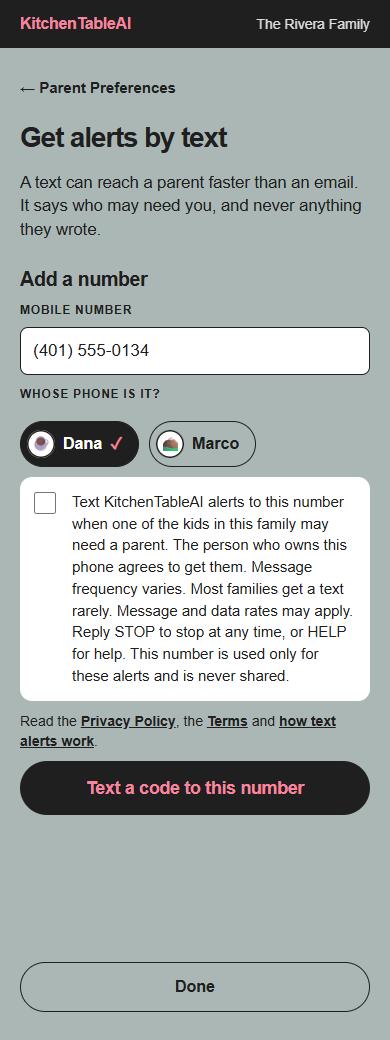
- In the KitchenTableAI app, a parent opens Parent Preferences and taps Get alerts by text.
- The parent types a mobile number and says whose phone it is.
- The parent checks a box. It is not checked for them. The box reads:
Text KitchenTableAI alerts to this number when one of the kids in this family may need a parent. The person who owns this phone agrees to get them. Message frequency varies. Most families get a text rarely. Message and data rates may apply. Reply STOP to stop at any time, or HELP for help. This number is used only for these alerts and is never shared.
- The parent taps Text a code to this number. A six-number code is texted to that number.
- The code is typed back into the app. No alert is ever texted to a number until its code has been typed back.
This is the step as a parent sees it:
The messages
There are three, and each one names KitchenTableAI.
- The code, once, when a number is added: “KitchenTableAI: your code is 123456. Type it in Parent Preferences to get alerts by text here. If you didn't ask for this, ignore it.”
- The confirmation, once, when the code is typed back: “KitchenTableAI: you'll get a text here if one of your kids may need you. Msg frequency varies. Msg & data rates may apply. Reply STOP to stop, HELP for help.”
- An alert, with the child's first name: “KitchenTableAI: Maya may need you. Please go and talk with her. Open the parent dashboard for more. Reply STOP to stop.”
How often
Message frequency varies. A text is sent only when an alert happens, and at most once an hour for each child. Most families get a text rarely, and many never get one.
What it costs
KitchenTableAI does not charge for texts. Message and data rates may apply from your mobile carrier.
Stopping, and getting help
Reply STOP to any text to stop them. Reply HELP for help, or write to hello@familyaiagreement.com. A parent can also remove a number in Parent Preferences at any time.
Your number
A mobile number is used only to send these alerts. It is never sold, never shared with anyone for their marketing, and never used for anything else. The Privacy Policy and the Terms say more.